
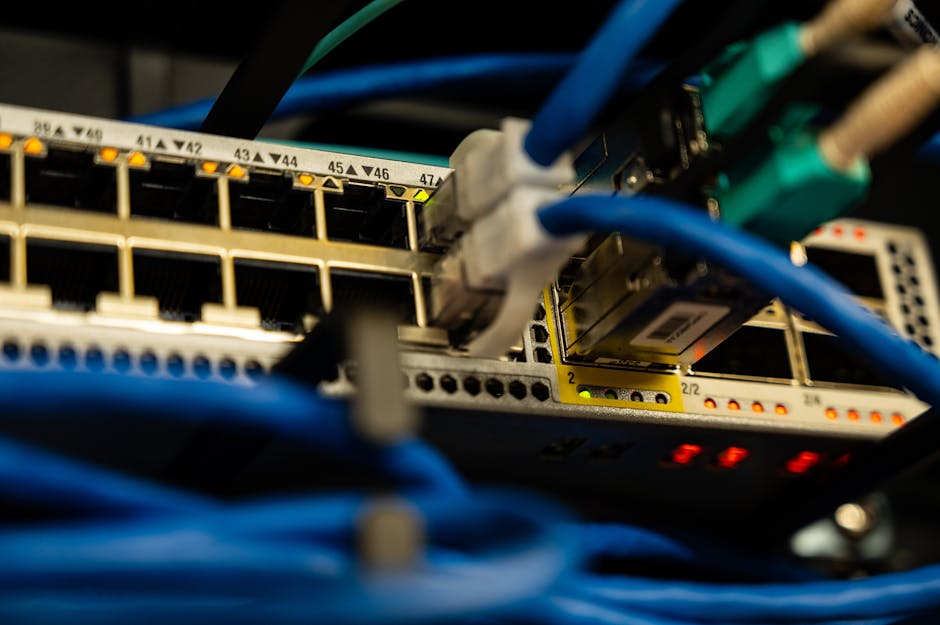
Nobody shows off network cabling. There are no before-and-after photos of a well-terminated Cat6 run, and no patient ever chose a practice because of its structured cabling. But cabling is the layer every other promise rests on: imaging speed, chart access, phone quality, and even the Wi-Fi your patients never complain about because it just works.
The problem with cabling decisions is that they hide. Once the walls are closed, a shortcut becomes a permanent limitation you pay for every single day in small increments: an imaging transfer that takes forty extra seconds, a workstation that drops off the network during the afternoon rush, a Wi-Fi dead spot in the one operatory with a chairside monitor.
Whether you are building out a new office or refreshing an existing one, these are the practices that keep the network boring in the best way.
Key takeaways
- Run wired Cat6 to everything stationary, and reserve Wi-Fi for things that move.
- Plan cabling before the walls close, with roughly 30 percent spare runs, because adding one later costs many times more.
- Segregate traffic: clinical, administrative, guest, and devices belong on separate networks, not one shared pipe.
- Label and document everything at installation; the person fixing a fault five years from now will thank you.
Practice 1: Wire everything that does not move
The temptation is wireless everywhere. It feels modern, and it avoids drilling. But in a dental office, wireless is the wrong default for anything stationary: imaging sensors and capture stations, operatory workstations, front-desk computers, printers, and network gear itself. Interference, wall density, and equipment churn make Wi-Fi a variable, and clinical workflows need constants.
The working rule we use across hundreds of buildouts: if it has a fixed location and a power cord, it gets a cable.
What stays on Wi-Fi: laptops and tablets on the go, patient phones (on a separate guest network), and occasionally a device that genuinely cannot be cabled.
Practice 2: Choose the cable and the drops deliberately
For a new or refreshed dental office:
- Use Cat6 at minimum (Cat6a where budgets allow), which carries the speed imaging transfers and intraoral video need today with headroom for the next decade.
- Home every run to a single equipment location, a small server closet or structured media enclosure, so the whole network can be serviced from one place.
- Pull spare runs to each operatory and the imaging area. The universal buildout regret is not too many drops, it is the one drop you did not pull and need a year later, after the ceiling is closed.
- Keep data runs away from electrical lines and equipment that generates interference, and never let them share a conduit with power.
Practice 3: Segment the network from day one
A flat network, where every device sees every other device, is the most common and most fixable weakness we find when assessing existing offices. Best practice is to separate traffic into segments (VLANs or the equivalent):
| Segment | What lives there | Why it is separate |
|---|---|---|
| Clinical | Operatory workstations, imaging devices, PACS | Patient-care systems get priority and strict access |
| Administrative | Front desk, billing, office management | Business functions cannot be disrupted by clinical traffic or vice versa |
| Guest | Patient and visitor Wi-Fi | Guests are completely walled off from patient data |
| IoT and auxiliary | TVs, smart devices, sensors, building systems | Unmanaged gadgets cannot touch anything that matters |
The guest network deserves emphasis, because it is a compliance issue as much as a courtesy. A guest device and a charting workstation sharing a network is the kind of finding that turns a routine security review into a project.
Practice 4: Business-grade hardware, not consumer gear
The hardware at the heart of the cabling matters as much as the cable:
- A business firewall with support for the segmentation above
- A managed switch (or switches) so each segment can be controlled and monitored
- Business-grade Wi-Fi access points, planned for coverage of the actual floor plan, not whatever the ISP box happens to reach
- UPS (battery backup) for the network core so a power blip does not take down phones and charting mid-appointment
Consumer gear is not cheaper once you count the hours the office spends rebooting it.
Practice 5: Label, document, and test before the walls close
The last 10 percent of the cabling project is what separates a maintainable office from a mystery box:
- Label both ends of every run.
- Test and certify every drop, and record the results.
- Photograph the inside of walls and ceilings before they close. When someone asks in three years whether a spare conduit exists, the photo answers instantly.
- Keep the documentation with the practice's other IT records, so any provider (not just the installer) can service the network.
We treat the documentation package as a deliverable, not a favor. It is the difference between a five-minute fix and an afternoon of tracing unlabeled cables through a closed ceiling.
Frequently Asked Questions
Should a dental office use Cat6 or Cat6a cabling?
Cat6 satisfies most dental practices today and for the visible future; Cat6a costs more and adds headroom for very high speeds over longer runs. For a new buildout with walls open, many practices take Cat6a for main trunks and Cat6 to workstations, but either way, the bigger factor is having enough labeled runs, not the label on the box.
Can patient Wi-Fi share the network with our clinical systems?
It should not. Guest Wi-Fi belongs on its own isolated segment, with no path to clinical or administrative systems. That separation is standard practice for HIPAA-aligned network design and it costs nothing extra when it is built in from the start, which is exactly why cabling and network planning belong in the buildout conversation, not after it.
How many network drops should each operatory have?
Plan at least two data drops per operatory, plus power, and pull spare runs to the imaging area and equipment location. The cheap insurance of a spare drop at installation time is many times cheaper than opening a closed ceiling later. Your practice-management setup and any chairside monitors will use the drops you have, and the extras are what keep future upgrades simple.
Conclusion
Cabling is the one part of dental IT where doing it right the first time is dramatically cheaper than doing it twice. Wire what stays put, pull spares, segment everything, label it all, and photograph the walls before they close. Five years of quiet, boring network reliability is the payoff.
If you are planning a buildout or a refresh, our IT installation team handles dental network design end to end, and the FAQ page covers the questions that come up around equipment, software, and support.
Sources/References
- HHS Office for Civil Rights, HIPAA Security Rule guidance: https://www.hhs.gov/hipaa/for-professionals/security/index.html
- TIA/EIA structured cabling standards overview (ANSI/TIA-568): https://www.tiaonline.org/
Related Reading

Dental Cloud Migration: A Step-by-Step Guide
Moving practice management software and imaging data off the local server cuts hardware costs and downtime — when it is done in the right order. This guide walks the full migration from audit to go-live without disrupting patient care.
READ MORE →
Dental Office Cybersecurity Assessment Checklist for Owners
Most dental practices carry serious security gaps they do not know about — outdated firmware, unmanaged endpoints, and unprotected email. Work through this owner-friendly checklist to see exactly where your practice stands.
READ MORE →
How to Plan Computers, Networks, and Software for a New Dental Office
A new dental office lives or dies by the technology plan laid before the walls go up. This guide covers workstations, network, server room, imaging, and software decisions — with a realistic timeline from lease signing to opening day.
READ MORE →